The EAFC Web App is a powerful online tool that helps players manage their EAFC team, cards, and progress without needing to open the full game. You can use it on your phone, tablet, or computer. The best part is that it runs directly in your browser, which makes it fast and easy to access anytime. For many players, the web app is the first place they go to trade players, open packs, and plan their team for the week. This guide will explain everything in simple words, with real examples and helpful tips.
What Is the EAFC Web App?
The EAFC web app is a website tool that lets you manage your EAFC team without launching the game. You can access it from any browser. Think of it as a “mini game” for managing your squad and items. You can view your club, make transfers, and organize your players easily. Many players use it because it saves time and helps them stay active even when they are away from their console or PC. This web app is especially useful during busy weeks when you want to keep improving your team.
How the EAFC Web App Helps You Play Better
Using the EAFC web app can make you a smarter player. When you manage your team daily, you learn what players sell for the most and which cards improve your squad. For example, if you notice a player is rising in value, you can sell them and buy a better player. The web app helps you plan ahead by letting you check prices and market trends. This way, you can build a stronger team faster. Many players say they win more games because their team is stronger and more balanced.
How to Log In to the EAFC Web App
Logging in to the EAFC web app is simple. First, open your browser and search for the web app. Then, sign in using your EA account. If you use two-step verification, you may need to confirm your login. Once you are in, you will see your club and items. Make sure you use the same EA account linked to your game. If you have multiple accounts, double-check you are using the correct one. This prevents mistakes like trading items on the wrong team.
Key Features of the EAFC Web App
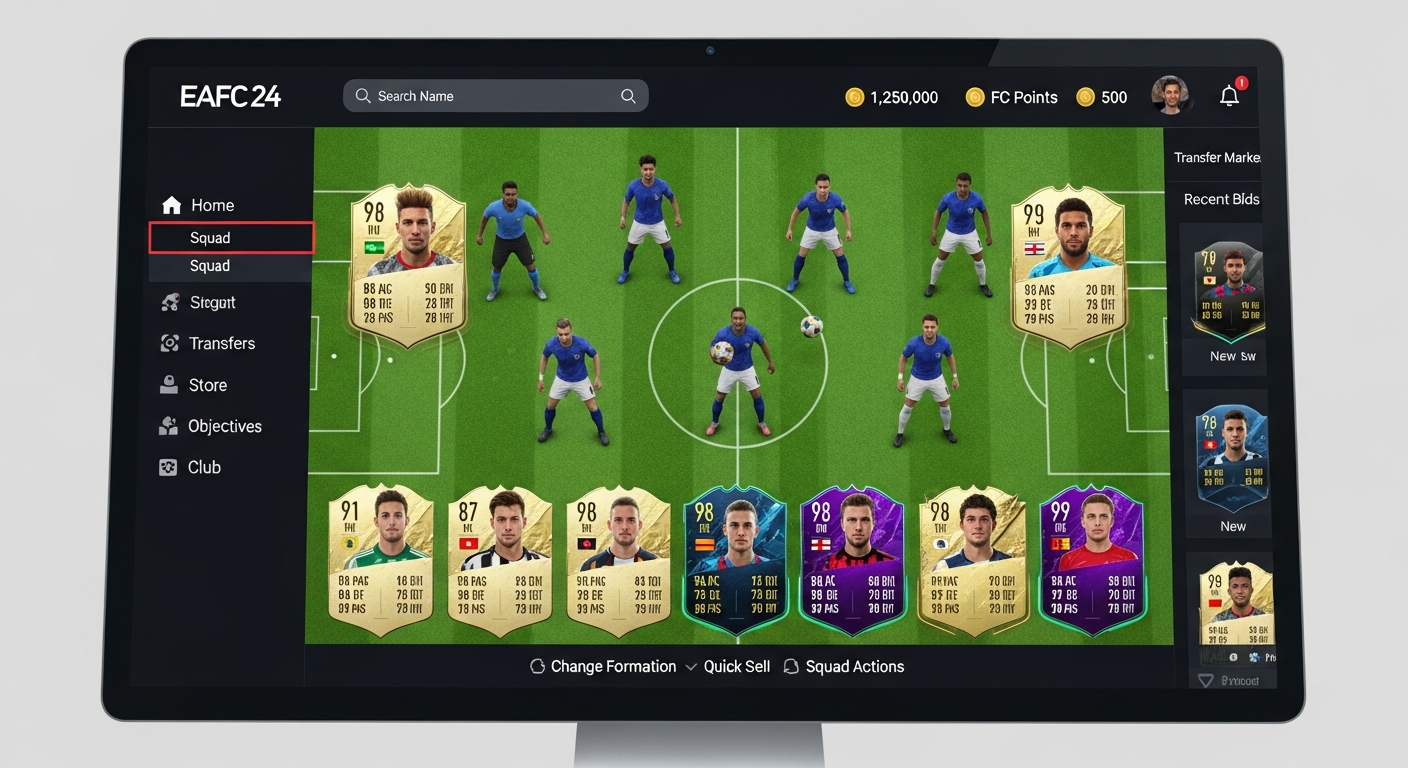
The EAFC web app has many useful features. You can access your club, manage players, trade on the market, and open packs. You can also set up your squad and search for players you want to buy. The web app lets you check player stats and compare options. Another great feature is the “transfer market,” where you can buy or sell players. This helps you earn coins and improve your team. It’s like having a full team manager right in your browser.
Why the EAFC Web App Is Better Than the Game Menu
The EAFC web app is often faster than the in-game menu. You don’t need to load the full game, which can take time. Instead, you open your browser and start managing instantly. It’s also more convenient if you’re on the go. For example, you can check the market while riding in a car or waiting in line. The web app saves time and helps you stay connected to your team every day. Many players use it to stay ahead in competitions and build better squads.
Real Examples of Using the EAFC Web App
Let’s say you want to buy a new striker. Using the EAFC web app, you can search the market, compare prices, and check player stats. Then you can place a bid or buy instantly. Another example is selling players: you can quickly list multiple players for sale, which saves time. You can also open packs and see what new players you get. These actions help you grow your team faster. The web app makes these tasks easy and quick.
Tips for Using the EAFC Web App Like a Pro
To use the EAFC web app like a pro, follow these tips:
- Check the market daily for deals.
- Compare player prices before buying.
- Sell players when their value is high.
- Save coins for big upgrades.
- Use the squad builder to test new formations.
These small habits can help you win more games and build a stronger team. Many top players use the web app daily to stay ahead of others.
Safety and Trust When Using the EAFC Web App
The EAFC web app is secure when you use official links and your EA account. Always avoid fake websites or third-party tools that ask for your password. If you see suspicious messages or offers, report them. Protect your account by using strong passwords and two-step verification. EA takes account safety seriously, but you also need to stay careful. Remember, your account is valuable, so treat it like a real treasure.
Common Issues and How to Fix Them
Sometimes the EAFC web app might not work due to server problems or internet issues. If it loads slowly, try refreshing the page or using a different browser. If your login fails, check your account details and reset your password if needed. If you still have trouble, wait a few hours and try again. Most issues are temporary and resolve quickly. Being patient and checking official EA updates helps a lot.
The Best Devices to Use the EAFC Web App
The EAFC web app works best on phones, tablets, and computers. A bigger screen helps you view your squad better and make smarter decisions. If you use a phone, make sure your internet is strong. If you use a computer, you can open multiple tabs for market searches. Many players prefer the computer because it is faster and easier to manage. But the web app is designed to work well on all devices, so you can choose what feels best for you.
How to Improve Your Team Using the EAFC Web App
To improve your team using the EAFC web app, focus on balanced players and good chemistry. Don’t just buy stars—choose players that fit your style. Use the web app to test different formations and players. You can also use it to track market trends and earn coins. This helps you buy better players without wasting coins. Over time, your team will become stronger and more competitive. The web app helps you make smarter choices every day.
EAFC Web App Biography Table (Quick Facts)
| Topic | Details |
| Name | EAFC Web App |
| Type | Web-based management tool |
| Purpose | Manage team, market, and club items |
| Best For | EAFC players who want quick access |
| Platform | Any browser (phone, tablet, PC) |
| Main Features | Transfer market, squad builder, club management |
| Security | Official EA login, two-step verification |
| Benefits | Saves time, improves team building, easy access |
| Common Uses | Buying/selling players, checking prices, planning squads |
| Limitations | Requires internet and valid EA account |
FAQs About EAFC Web App
1. What is the EAFC web app used for?
The EAFC web app is used to manage your EAFC team, trade players, and check your club without opening the full game.
2. Can I use the web app on mobile?
Yes, the web app works on phones, tablets, and computers.
3. Is the EAFC web app safe?
It is safe when you use official links and your EA account. Avoid fake websites and never share your password.
4. Why does the web app sometimes not load?
This happens due to server issues or weak internet. Try refreshing or checking later.
5. Do I need the game to use the web app?
You need an EAFC account, but you don’t need to open the full game to use the web app.
6. How often should I use the EAFC web app?
Daily use is best. Checking the market daily helps you build a stronger team faster.
Conclusion
The EAFC web app is a smart and easy way to manage your EAFC team from anywhere. It helps you save time, plan better, and improve your squad faster. By using the web app daily, you can stay ahead in the game and make better decisions. If you want to build a strong team and win more matches, the web app is a tool you should not ignore.